 TurfAI Developer Docs
Workflows & activities
The DAG model, triggers, variables, and the execution lifecycle — with runnable curl / Python / Node examples.
A workflow is a directed acyclic graph (DAG) of nodes. The saved, reusable definition is
an activity (/api/activities); each run of it is a workflow execution
(/api/workflow-executions). The graph is acyclic by design — decision nodes create
branches, never loops (cycles are rejected with "Circular dependency detected"). To repeat work
over a list of items, use the for_each_task node (sequential or parallel, max_parallel
default 10).
Where workflows sit
Industry guidance draws a line between workflows — systems where the LLM and tools follow predefined paths — and agents, where the model directs its own path. The TurfAI Visual Workflow Builder canvas is the workflow side of that line: you wire the graph, so every run is predictable and auditable. Reach for an agent only when the steps can't be fixed up front.
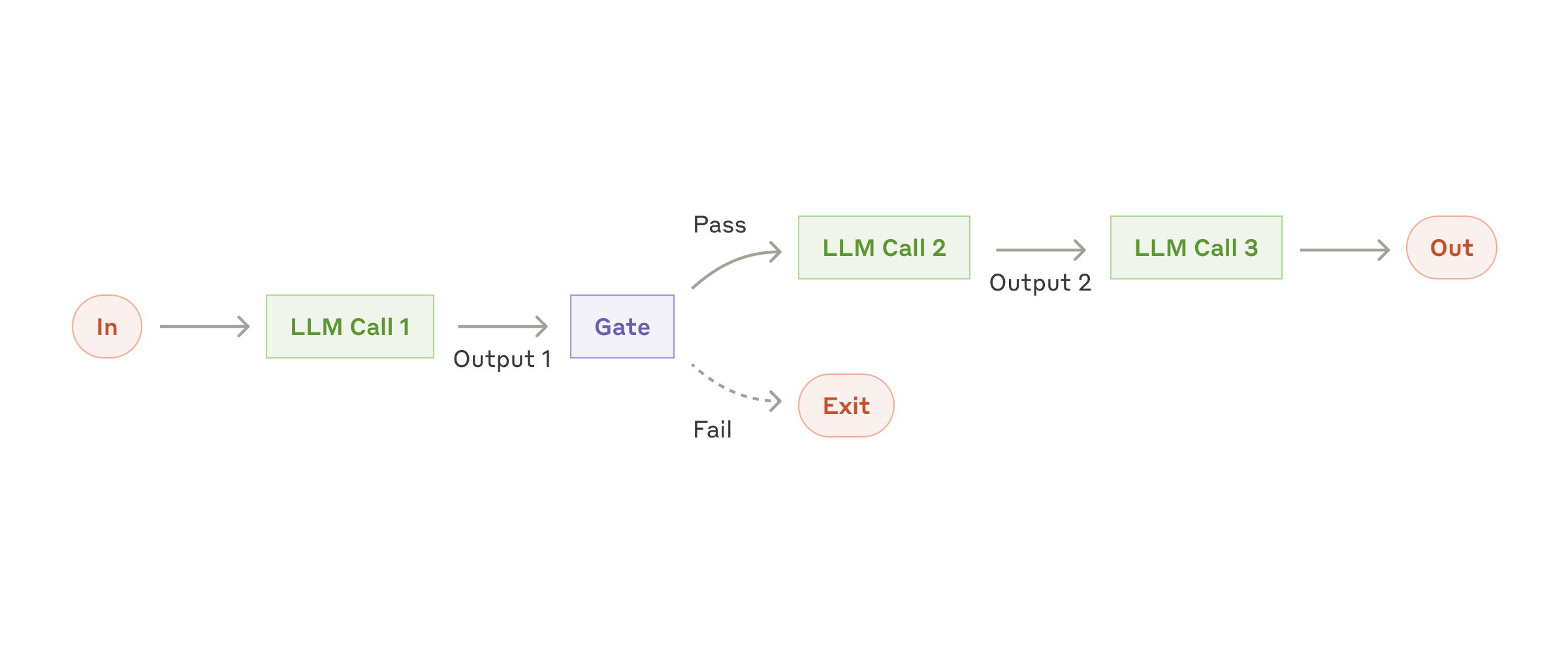
The simplest workflow: chain steps and gate between them — exactly a node DAG.
Source: Anthropic ↗Workflow-vs-agent distinction adapted from Anthropic's "Building effective agents".
What you'll build
By the end of this page you'll be able to define a workflow as an activity, trigger an execution, poll it to a terminal state, and read the per-node outputs — driving the whole thing over HTTP in curl, Python, or Node.
Prerequisites
- A JWT for the authenticated
/activitiesand/workflow-executionscalls — see Authentication. (Webhook triggers use a per-webhook secret instead — see Quickstart.) - The base URL. Staging is
https://apisandbox.turfai.in/api; local ishttp://localhost:1338/api. Examples below use staging. - A saved activity id to run — create one in the worked example below, or use one you built in the UI.
Export these once and the snippets below run as-is:
export TURFAI_JWT=… and export BASE=https://apisandbox.turfai.in/api.
The workflow definition
A workflow_definition has nodes, edges, and an input_schema. Each node declares a
task_type and a config; edges connect node IDs. The input_schema and output_schema
fields on the activity describe the run's overall contract.
Frontend vs backend node format. The React Flow builder stores node.type as the
specific task type (e.g. "classification_task"). The executor only runs nodes whose
type === "task", reading the real type from node.data.task_type. When you author a
definition by hand for execution, use the backend format below (type: "task"), and
always include input_schema — omitting it is a 400 ("does not include an input schema").
See data schemas.
{
  "nodes": [
    {
      "id": "classify-1",
      "type": "task",
      "position": { "x": 0, "y": 0 },
      "data": {
        "label": "Classify Document",
        "task_type": "classification_task",
        "config": { "classification_type": "document_type" }
      }
    },
    {
      "id": "extract-1",
      "type": "task",
      "position": { "x": 240, "y": 0 },
      "data": {
        "label": "Extract Data",
        "task_type": "extraction_task",
        "config": { "output_format": "json" }
      }
    }
  ],
  "edges": [
    { "id": "e1", "source": "classify-1", "target": "extract-1" }
  ],
  "input_schema": {
    "type": "object",
    "required": ["file_url"],
    "properties": { "file_url": { "type": "string" } }
  }
}
Validate a definition before saving with POST /workflows/validate — it catches cycles and
edges that reference missing nodes, returning { "valid": true, "errors": [] }.
Define an activity
POST /activities saves a workflow_definition as a reusable activity and returns its id.
GET /activities/:id reads one back. Both need your JWT. Wrap the request body in the Strapi
data envelope; the response uses it too.
# Create
curl -X POST "$BASE/activities" \
  -H "Authorization: Bearer $TURFAI_JWT" \
  -H "Content-Type: application/json" \
  -d '{
    "data": {
      "name": "Invoice triage",
      "workflow_type": "document_processing",
      "status": "draft",
      "workflow_definition": { "nodes": [], "edges": [], "input_schema": { "type": "object", "properties": {}, "required": [] } }
    }
  }'

# Read it back (id from the create response)
curl "$BASE/activities/42" -H "Authorization: Bearer $TURFAI_JWT"
import os, requests
BASE = os.environ["BASE"]
HEAD = {"Authorization": f"Bearer {os.environ['TURFAI_JWT']}"}
def create_activity(definition: dict) -> int:
r = requests.post(f"{BASE}/activities", headers=HEAD, json={
"data": {
"name": "Invoice triage",
"workflow_type": "document_processing",
"status": "draft",
"workflow_definition": definition,
}
})
r.raise_for_status()
return r.json()["data"]["id"]
def get_activity(activity_id: int) -> dict:
r = requests.get(f"{BASE}/activities/{activity_id}", headers=HEAD)
r.raise_for_status()
return r.json()["data"]const BASE = process.env.BASE!;
const HEAD = {
Authorization: `Bearer ${process.env.TURFAI_JWT}`,
"Content-Type": "application/json",
};
export async function createActivity(definition: object): Promise<number> {
const res = await fetch(`${BASE}/activities`, {
method: "POST",
headers: HEAD,
body: JSON.stringify({
data: {
name: "Invoice triage",
workflow_type: "document_processing",
status: "draft",
workflow_definition: definition,
},
}),
});
if (!res.ok) throw new Error(`create failed: ${res.status}`);
return (await res.json()).data.id;
}
export async function getActivity(id: number) {
const res = await fetch(`${BASE}/activities/${id}`, { headers: HEAD });
if (!res.ok) throw new Error(`get failed: ${res.status}`);
return (await res.json()).data;
}Triggers
A workflow starts from one of:
- Webhook — an HTTP
POST(JSON ormultipart/form-datafile upload). Body fields becomeinputs; uploaded files injectinputs.<field>_file_urlandinputs.<field>_document_id. Returns anexecution_id+ a short-livedpolling_token. See Quickstart and the webhook guide. - Event — an external event (e.g. a new file in a watched Drive folder) via the Event Bus — see event-driven.
- Schedule — a cron run.
- Manual / direct — create the execution, then start it:
POST /workflow-executions(with{ "data": { "activity": 42, "inputs": {…} } }) →POST /workflow-executions/:id/execute.
Trigger an execution
This is the most direct way to run a saved activity. Create the execution, then start it;
execute queues the run and returns status: "queued".
# 1. Create an execution bound to activity 42
EXEC=$(curl -s -X POST "$BASE/workflow-executions" \
  -H "Authorization: Bearer $TURFAI_JWT" \
  -H "Content-Type: application/json" \
  -d '{ "data": { "activity": 42, "inputs": { "file_url": "gs://bucket/invoice.pdf" } } }' \
  | python3 -c 'import sys,json;print(json.load(sys.stdin)["data"]["id"])')

# 2. Start it
curl -X POST "$BASE/workflow-executions/$EXEC/execute" \
  -H "Authorization: Bearer $TURFAI_JWT" \
  -H "Content-Type: application/json" \
  -d '{ "inputs": { "file_url": "gs://bucket/invoice.pdf" } }'
def trigger(activity_id: int, inputs: dict) -> int:
created = requests.post(f"{BASE}/workflow-executions", headers=HEAD, json={
"data": {"activity": activity_id, "inputs": inputs}
})
created.raise_for_status()
exec_id = created.json()["data"]["id"]
started = requests.post(
f"{BASE}/workflow-executions/{exec_id}/execute",
headers=HEAD, json={"inputs": inputs},
)
started.raise_for_status()
return exec_idexport async function trigger(activityId: number, inputs: object): Promise<number> {
const created = await fetch(`${BASE}/workflow-executions`, {
method: "POST", headers: HEAD,
body: JSON.stringify({ data: { activity: activityId, inputs } }),
});
if (!created.ok) throw new Error(`create exec failed: ${created.status}`);
const execId = (await created.json()).data.id;
const started = await fetch(`${BASE}/workflow-executions/${execId}/execute`, {
method: "POST", headers: HEAD, body: JSON.stringify({ inputs }),
});
if (!started.ok) throw new Error(`execute failed: ${started.status}`);
return execId;
}Variables and data flow
Reference any earlier value with {{variable}} templates; pull nested fields with JSONPath.
At render time, the executor replaces {{var}} from the merged inputs and outputs. It leaves an
unresolved reference intact as the literal {{var}} text (rather than blanking it), which
helps when you debug. Variables come from three sources:
- Trigger payload — what the webhook/event delivered, available as
inputs.*. - Upstream node outputs — e.g.
{{classify-1.document_type}}from a classify node. - Workflow context —
user_id,execution_id.
Webhook { "file_url": "gs://bucket/invoice.pdf" }
  → classify-1 uses {{file_url}}          → outputs { "document_type": "invoice", "confidence": 0.96 }
  → route-1 branches on {{classify-1.document_type}}
  → extract-1 uses {{file_url}}           → outputs { "vendor": "Acme", "total": 1240.00 }
  → email-1 uses {{extract-1.vendor}}, {{extract-1.total}}
A complete worked example
This example is a classify → decision → extract DAG. The decision node routes on the
classifier's output through labelled edges, and only the matching branch runs. It uses the
backend node format, so you can pass it as workflow_definition to
POST /activities.
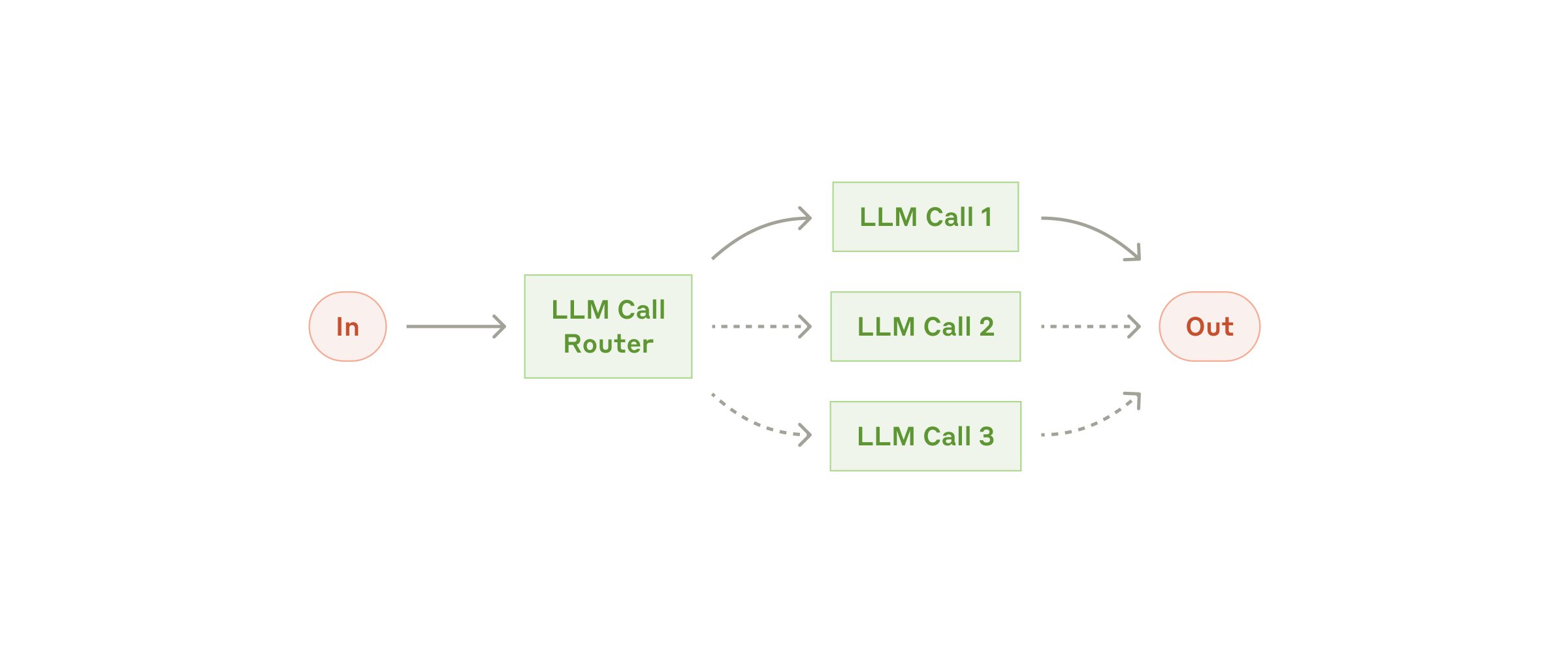
Routing: a classifier sends each input down a specialized branch — that's the decision node.
Source: Anthropic ↗{
"nodes": [
{
"id": "classify-1",
"type": "task",
"position": { "x": 0, "y": 0 },
"data": {
"label": "Classify Document",
"task_type": "classification_task",
"config": {
"classification_type": "document_type",
"file_url": "{{file_url}}"
}
}
},
{
"id": "route-1",
"type": "task",
"position": { "x": 240, "y": 0 },
"data": {
"label": "Route by type",
"task_type": "decision",
"config": {
"left_operand": "{{classify-1.document_type}}",
"operator": "==",
"right_operand": "invoice"
}
}
},
{
"id": "extract-1",
"type": "task",
"position": { "x": 480, "y": -80 },
"data": {
"label": "Extract invoice fields",
"task_type": "extraction_task",
"config": {
"output_format": "json",
"file_url": "{{file_url}}",
"fields": ["vendor", "invoice_number", "total"]
}
}
},
{
"id": "notify-1",
"type": "task",
"position": { "x": 480, "y": 80 },
"data": {
"label": "Flag non-invoice",
"task_type": "email_send_task",
"config": {
"to": ["[email protected]"],
"subject": "Unrecognised document: {{classify-1.document_type}}",
"body": "A document classified as {{classify-1.document_type}} skipped extraction."
}
}
}
],
"edges": [
{ "id": "e1", "source": "classify-1", "target": "route-1" },
{ "id": "e2", "source": "route-1", "target": "extract-1", "label": "true" },
{ "id": "e3", "source": "route-1", "target": "notify-1", "label": "false" }
],
"input_schema": {
"type": "object",
"required": ["file_url"],
"properties": {
"file_url": { "type": "string", "description": "gs:// or https URL of the source document" }
}
}
}Watch for these common mistakes:
- Every executable node is
type: "task"; the real type lives indata.task_type. - Email recipients (
to) must be an array, even for one address — a string is counted character-by-character. See the common pitfalls. - A decision node has exactly two outgoing edges, labelled literally
trueandfalse(validation enforces this); the executor follows the edge matching the condition result.
Execution lifecycle
Execution is asynchronous. You start a run and poll a status endpoint until it reaches a terminal state. Internally the run also flows through the queue → router → processor pipeline described in the communication standard, but as a caller you only see the statuses below.
| Status | Meaning |
|---|---|
queued | Accepted, waiting for a worker |
running | Executing nodes |
awaiting_user_input | Paused at a human step (see HITL); carries awaiting_input_schema + correlation_token, resume with POST /workflow-executions/:id/resume |
completed | Finished; read outputs |
failed | Check error (and the failing node in task_states) |
Poll for status
GET /workflow-executions/:id/status returns the live status and per-node task_states;
GET /workflow-executions/:id returns the full record including data.outputs. Poll every 2–5s
and stop on a terminal status.
curl "$BASE/workflow-executions/93/status" \
  -H "Authorization: Bearer $TURFAI_JWT"
import time
def poll(exec_id: int, attempts: int = 30) -> dict:
for _ in range(attempts):
r = requests.get(f"{BASE}/workflow-executions/{exec_id}/status", headers=HEAD)
r.raise_for_status()
data = r.json()["data"]
if data["status"] == "completed":
return data["outputs"]
if data["status"] == "failed":
raise RuntimeError(data.get("error"))
time.sleep(2)
raise TimeoutError("polling timed out")const sleep = (ms: number) => new Promise((r) => setTimeout(r, ms));
export async function poll(execId: number, attempts = 30) {
for (let i = 0; i < attempts; i++) {
const res = await fetch(`${BASE}/workflow-executions/${execId}/status`, { headers: HEAD });
if (!res.ok) throw new Error(`status failed: ${res.status}`);
const { data } = await res.json();
if (data.status === "completed") return data.outputs;
if (data.status === "failed") throw new Error(data.error);
await sleep(2000);
}
throw new Error("polling timed out");
}A completed status response (outputs are keyed by "<node label>-<node id>"):
{
  "data": {
    "id": 93,
    "status": "completed",
    "outputs": {
      "Classify Document-classify-1": { "document_type": "invoice", "confidence": 0.96 },
      "Extract invoice fields-extract-1": {
        "extraction_result": { "vendor": "Acme", "invoice_number": "INV-2031", "total": 1240.00 },
        "metadata": { "output_format": "json", "batch_status": "completed" }
      }
    },
    "task_states": {
      "classify-1": { "status": "completed" },
      "route-1": { "status": "completed" },
      "extract-1": { "status": "completed" }
    },
    "error": null,
    "started_at": "2025-11-19T11:28:42.000Z",
    "completed_at": "2025-11-19T11:28:44.995Z"
  }
}
Troubleshooting
| Symptom | Likely cause & fix |
|---|---|
A {{var}} shows up literally in output / a field is empty | The reference didn't resolve — the key isn't in inputs or the upstream node's output. Check the exact key ({{node-id.field}}) against outputs from a prior run. |
| "Executing workflow with 0 steps" / nothing runs | Nodes have a specific type (e.g. "email_send_task"). The executor only runs type: "task" — move the specific type into data.task_type. |
POST /activities returns 400 "does not include an input schema" | The definition is missing input_schema. Always include { "type": "object", "properties": {}, "required": [] }. |
| Validation rejects the graph | A cycle ("Circular dependency detected" — use for_each_task to iterate instead), an edge pointing at a missing node id, or a decision node without exactly one true and one false edge. Run POST /workflows/validate and read errors. |
Execution stuck in awaiting_user_input | It's at a human step. Submit the response and resume with POST /workflow-executions/:id/resume using the correlation_token — see the HITL guide. |
| 401 mid-poll on a webhook-triggered run | The polling_token is a ~1h JWT scoped to one execution. Switch to your JWT or re-trigger. |
failed with WORKFLOW_DEADLINE_EXCEEDED | The run exceeded execution_deadline_seconds (default 1800s, clamped 60–14400). Raise it on the activity or split the workflow. |
| Transient node failure that never recovers | Retries are exhausted (max_retries, resolved per-node → per-workflow → tenant → default 3). Inspect the failing node in task_states and the error. |
Ownership and levels
Activities have a level: system (platform-provided), user (yours, the default), or
internal (hidden transient workflows). To customize a system workflow, clone it into a
user-owned copy with POST /activities/:id/instantiate — your edits won't be overwritten when
the original updates. The copy is created as a draft named "X (Copy)". This is a different
endpoint from POST /workflow-templates/:id/instantiate, which
Solution Packs use to create a draft workflow from a template.
Activities also carry execution controls surfaced in the table above:
execution_deadline_seconds, max_retries, and a data_shield_policy
(see Data Shield).
Next steps and reference
- Quickstart — the webhook path end to end.
- Task types — what each node can do and its
configschema. - HITL guide — pausing and resuming on human input.
- Event-driven — triggering from external events.
- Full endpoint and field details: Workflow integration guide and the Workflow Execution API. These are the synced source of truth, so link to them instead of copying their content.